
3e Encore
SECUTIX SAEvents
3.19.00 Reviews
- Version
- 4.2616.3
- Installs
- 10.00K
- Age Rating
- Everyone
Screenshots
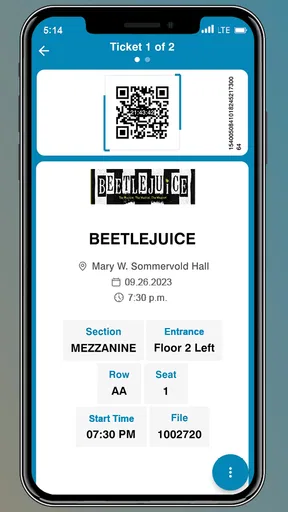
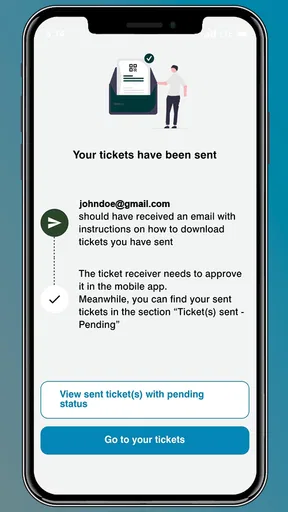
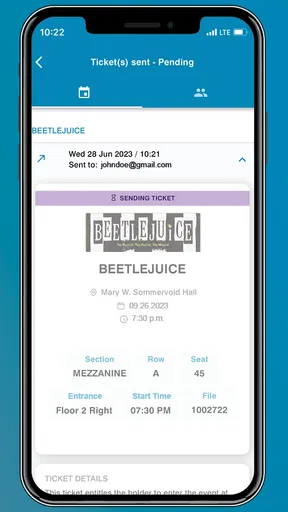
Our Review of 3e Encore
 Analysis by Appyee
Buying a ticket for an event should feel simple: find the booking, keep the ticket ready, and present it when you arrive. 3e Encore takes that basic need and places it inside a dedicated mobile ticketing app from SECUTIX SA. I found its purpose refreshingly narrow compared with broad event-discovery platforms. It is not trying to be a social network, a calendar, or a general entertainment guide. Its value depends on how well it handles the ticket journey connected to the events it supports.
That focus makes it most interesting for people who already receive or purchase tickets through an organization using the service. If your venue, promoter, institution, or event organizer directs you to this app, it can provide a more focused place for access than a crowded email inbox. If you are looking for a universal ticket wallet that works with every event provider, however, you should keep your expectations realistic. This is a service-linked tool, not a replacement for every ticketing system on your phone.
How I used it as part of a normal event day
For me, a normal event day is less stressful when I separate ticket access from all the other details competing for attention. I would check the booking early, then keep directions and group messages in their usual apps rather than trying to manage everything from one screen. That routine also makes it easier to spot whether a delay is coming from the ticket workflow or from something outside it.
The baseline workflow is deliberately narrow
My practical approach with an event-ticketing app is to treat it as part of a sequence rather than as the whole event experience. First, I identify where the ticket was issued. Then I open the app, locate the relevant event information, and make sure the ticket is accessible before leaving home. Finally, I keep the phone charged and avoid waiting until the entrance to solve account or display problems.
That habit matters especially with a specialized application such as this one. The app’s store summary describes it as a modern mobile ticketing application, but the useful question is not whether it sounds advanced. The useful question is whether it reduces the number of steps between receiving a ticket and showing it at the door. In my view, that is the standard it should be judged against.
A realistic example is an evening event after work. I would open 3e Encore earlier in the day, check that the correct event is visible, and confirm that I can reach the ticket without searching through old messages. At the venue, I would open it before joining the entrance queue rather than pulling it up while people are waiting behind me. This is a small routine, but it is one of the strongest practical benefits of using a dedicated ticket app: preparation becomes repeatable.
I also recommend checking the ticket after any change to the event plan. If you switch phones, sign out, reinstall the application, or move between accounts, do not assume that the entrance screen will behave exactly as it did before. Ticketing is one of those situations where a few seconds of preparation can prevent a stressful conversation at the door.
What I would check before leaving home
I would not rely on a screenshot as my main plan. A dedicated ticketing application is intended to present the current ticket in its own context, and using the app keeps the workflow closer to the way the ticket was issued. Screenshots can also become confusing when several events look similar or when the visible code is not the part staff expect to scan.
My preferred routine is simple: open the app, select the event, inspect the date and venue information, and leave the ticket screen easy to reach. If I am attending with another person, I decide in advance whether each person will use their own phone or whether one device will be used for everyone. That choice affects how quickly the group can pass through the entrance.
For a family or group, one-phone access can be convenient, but it creates a single point of failure. If the battery runs low, the screen becomes difficult to read, or the account needs attention, every ticket may be affected. Separate devices take a little more coordination, yet they can make the group less dependent on one handset. I would choose based on the size of the group and how comfortable everyone is with the app.
Settings and phone habits that deserve attention
There is no benefit in changing every phone setting just because an app is installed. Instead, I would check the practical basics: whether notifications from the app are allowed, whether the phone can display the ticket clearly, and whether battery-saving settings might interfere with opening it at the worst moment. These are ordinary phone controls, but they are especially relevant when access to an event depends on a live screen.
I would also make sure the device has enough free space and that the app is not being restricted by an aggressive battery manager. I am not suggesting that every phone will have a problem; rather, event entry is a poor time to discover that the operating system has suspended an app you rarely use. Keeping the application updated is another sensible habit, particularly when the current version is 4.2616.3.
The minimum operating-system requirement is Android 7.0, which gives the app a broad compatibility range on Android devices. That does not guarantee identical behavior on every handset, because screen sizes, manufacturers, and system settings vary. On an older phone, I would test the ticket display before the event instead of assuming that an app that installs will feel equally smooth during a busy entrance.
Notifications can be useful when they relate to an event you are attending, but I prefer not to treat them as my only reminder. A notification may be dismissed accidentally or buried among unrelated alerts. My repeatable system is to keep the event details in the app and add a separate personal reminder for travel time. That separates ticket access from the rest of the day’s planning.
Faster patterns for repeat users
The fastest users are not necessarily the people who tap quickest. They are the people who remove decisions before the event begins. If I have used the app for more than one event, I would adopt the same sequence every time: open it from the same place on my phone, go directly to the relevant event, and check the ticket before traveling.
That consistency is more valuable than hunting for a shortcut that may not exist on every device. I would place the app somewhere easy to find, but I would avoid assuming that an operating-system shortcut or widget is available unless the phone actually shows one. The reliable shortcut is a habit: app location, account readiness, event selection, ticket display.
For people who attend events frequently, I would separate “planning time” from “entry time.” During planning, review the event and make sure the right account is active. During entry, do not explore unrelated screens or reorganize anything. Go straight to the ticket. This reduces the chance of showing the wrong event, especially when several bookings are stored together.
Another useful pattern is to prepare for poor connectivity without inventing a guarantee that the app works offline. I would open the ticket shortly before leaving and keep the application available in the recent-apps view, but I would not assume that every ticket can be displayed without a connection. If reliable access is essential, I would also follow any instructions supplied by the event organizer. That is a sensible distinction: preparation can reduce risk, but it cannot turn an unknown network condition into a guaranteed offline mode.
When attending with someone else, I would decide who is responsible for opening the ticket and who is responsible for directions or timing. This sounds minor, yet it prevents a common queue problem where everyone is searching on separate phones at once. The app can be the ticket tool while another app handles maps, messages, or travel details.
Where the focused design helps
Compared with a general email inbox, a dedicated ticketing app can make event access feel less scattered. Emails may contain long conversations, promotional material, attachments, and several similar-looking confirmations. A ticket application gives the booking a more direct role. For me, that is the clearest reason to use it when an event organizer supports it.
Compared with a broad ticket marketplace, the experience is also more specialized. A marketplace is often better for discovering events, comparing options, or buying from different providers. 3e Encore makes more sense after the ticket relationship already exists. I would not install it expecting a large catalog of unrelated events; I would use it because a particular event or organization has placed the ticket there.
It also differs from a generic digital wallet. A wallet may be convenient for collecting passes from multiple services, but it can depend on what each issuer supports and how much event information is preserved. A dedicated ticketing app may offer a more direct path for the issuing system, while a wallet may be better for keeping many unrelated passes together. The better option depends on whether your priority is provider-specific access or one central place for everything.
This trade-off is important. A specialized app can be clearer when it is the official route for an event, but it adds another application to your phone. If you attend only one event from the supported organization, the extra installation may feel unnecessary. If you regularly receive tickets through the same system, the consistent workflow becomes more worthwhile.
Advanced limits I would keep in mind
The app’s average rating is 3.1 from around seventeen ratings, and there are around nine written reviews. That is a modest sample, so I would not treat the number as a final verdict on every person’s experience. Still, it suggests that the app deserves a practical test before an important event rather than blind confidence based on its polished description.
Its reach is also still relatively small, with over ten thousand installs. That does not automatically indicate poor quality, because a ticketing tool can be useful within a specific event network without having mass-market adoption. It does mean that I would think of it as a targeted service rather than a universally established ticket wallet.
The app is free, which removes one obvious barrier to trying it. Free access does not remove the need to understand the event’s own ticket rules, though. The app can present a ticket, but it should not be confused with a guarantee about refunds, transfers, entry times, seating changes, or venue policies. Those matters belong to the event arrangement and organizer instructions, so I would read those messages separately.
Its Everyone content rating makes it suitable from an age-classification perspective, but that does not mean every event itself is intended for every age. An event can have its own admission rules, and I would check those before buying or attending. The rating describes the app’s content classification, not the audience requirements of every event represented inside it.
I would also be cautious when managing tickets for other people. Before handing over a phone or forwarding access, check whether the intended attendee can use the ticket in the required way. A ticket may be connected to an account or event workflow, and moving it casually between people can create confusion. I would follow the instructions associated with the booking instead of assuming that every ticket behaves like a freely shareable image.
Another limit is that a ticket app is not automatically an event-management assistant. It may help with access, but I would still use a calendar for travel time, a map for directions, and messages for coordinating a group. Trying to force one narrow tool to replace all three usually creates more friction, not less.
Who should use it and who should skip it
I would recommend trying 3e Encore if a trusted event organizer specifically uses it, especially if you dislike searching through email for a confirmation at the entrance. It is also a sensible choice for repeat attendees who want one familiar ticket workflow and are willing to prepare before leaving home.
I would be more hesitant if you are searching for events across many unrelated providers. A marketplace or event-discovery service will probably be more useful for that job. Likewise, if your main goal is to store every airline pass, concert ticket, membership card, and venue booking in one universal place, a broader wallet may fit your habits better.
People using older Android phones should install and test it before relying on it. Android 7.0 compatibility is helpful, but real-world comfort depends on the phone’s speed, display, battery condition, and system behavior. I would not wait until the queue to find out that the screen is too dim or the app takes too long to open.
For occasional users, the decision is straightforward: use it when the event requires or strongly recommends it, then remove it later if it no longer serves a purpose. For frequent users of the same ticketing network, keeping it installed can be justified by the saved search time and the repeatable access routine.
My verdict after building a reliable routine
3e Encore is best understood as a focused access tool rather than a complete event companion. Its strongest quality is its narrow purpose: when your ticket belongs in this system, the app gives you a dedicated place to prepare for entry instead of leaving the booking buried among messages and attachments.
I like the way it encourages a disciplined workflow, but I would not call it effortless in every situation. The experience still depends on account readiness, phone condition, event instructions, and the quality of the connection when the ticket is needed. Those are not reasons to reject it; they are reasons to use it deliberately.
SECUTIX SA positions it as a state-of-the-art mobile ticketing application, yet my recommendation is based on something more practical than that phrase. I would install it when an organizer points me to it, open the ticket before traveling, keep a backup plan for the phone, and avoid treating it as a universal replacement for calendars, wallets, or event marketplaces.
Released on July 18, 2023, and currently offered as a free app, it is an easy tool to try when it is part of your event’s ticketing process. My final view is positive but specific: use it as the prepared doorway to a supported event, not as a general-purpose ticket solution. With that expectation, its focused design can be convenient; without it, you may find a broader alternative more useful.
Verdict
Strengths of 3e Encore
- Simple interface makes core tools easy to find.
- Runs smoothly on many older Android devices.
- Useful offline access for basic features.
- Low storage requirements compared with similar apps.
- Regular updates help maintain compatibility and stability.
Limitations of 3e Encore
- Some advanced options may feel limited for experienced users.
- The free version may include advertisements or locked features.
- Performance can vary on newer devices with aggressive battery saving.
- Help documentation may not explain every function clearly.
- Account or permission requests may feel excessive for basic use.
Similar Picks in This Category
View All
Easy Quran Mp3 Audio Offline
Muslim Worldapp4.7

Invitation Maker: Cards & RSVP
Greetings Island4.9

StubHub - Live Event Tickets
StubHub4.3

Fever: Events & Tickets
Fever Labs4.7

Epic Freebie Games Radar
Arioch Pds - Apps & Games4.4

Invitation card Maker, Design
Splendid App Maker4.9
Frequently Asked Questions
What is 3e Encore, and what can I use it for?
3e Encore is a companion application designed to give users access to information, tools, and services connected with the 3e Encore platform. Depending on your organization or account, it may help you view relevant content, manage activities, receive updates, and stay connected from a mobile device. Available features can vary, so the experience may differ between users and institutions.
Is 3e Encore free to download and use?
The application can generally be downloaded without paying an upfront installation fee, but access to its features may depend on your organization, membership, subscription, or account permissions. Some services connected with 3e Encore could require separate payment or enrollment. Before downloading, check the app-store listing and confirm with the organization providing access so you understand any costs or restrictions.
Do I need an account or invitation to use 3e Encore?
In most cases, 3e Encore is intended for users who already have a relationship with the organization or service supporting the app. You may need to sign in with existing credentials, create an account, or use an invitation or access code. If registration fails, verify your details and contact the relevant administrator, since ordinary app installation may not automatically provide access.
What permissions and personal information does 3e Encore require?
The permissions requested by 3e Encore may depend on the features enabled for your account and device. The app could request access to notifications, internet connectivity, or other information needed to provide its services. Review the privacy policy and permission prompts carefully before accepting them. Only grant access that seems appropriate, and check the developer’s data-safety information in the store.
Will 3e Encore work on my Android or iPhone without an internet connection?
3e Encore is primarily intended for connected use because many of its functions depend on retrieving current account information, content, or updates from online services. Some previously loaded material may remain visible temporarily, but you should not assume that all features work offline. For the most reliable experience, use a supported operating-system version and a stable Wi-Fi or mobile-data connection.
